Every field a real wedding asks for
Allergies, meal choice, notes, kids, plus-ones, transport, welcome event, and after-party — set per client.
RSVP & guest list · For wedding planners
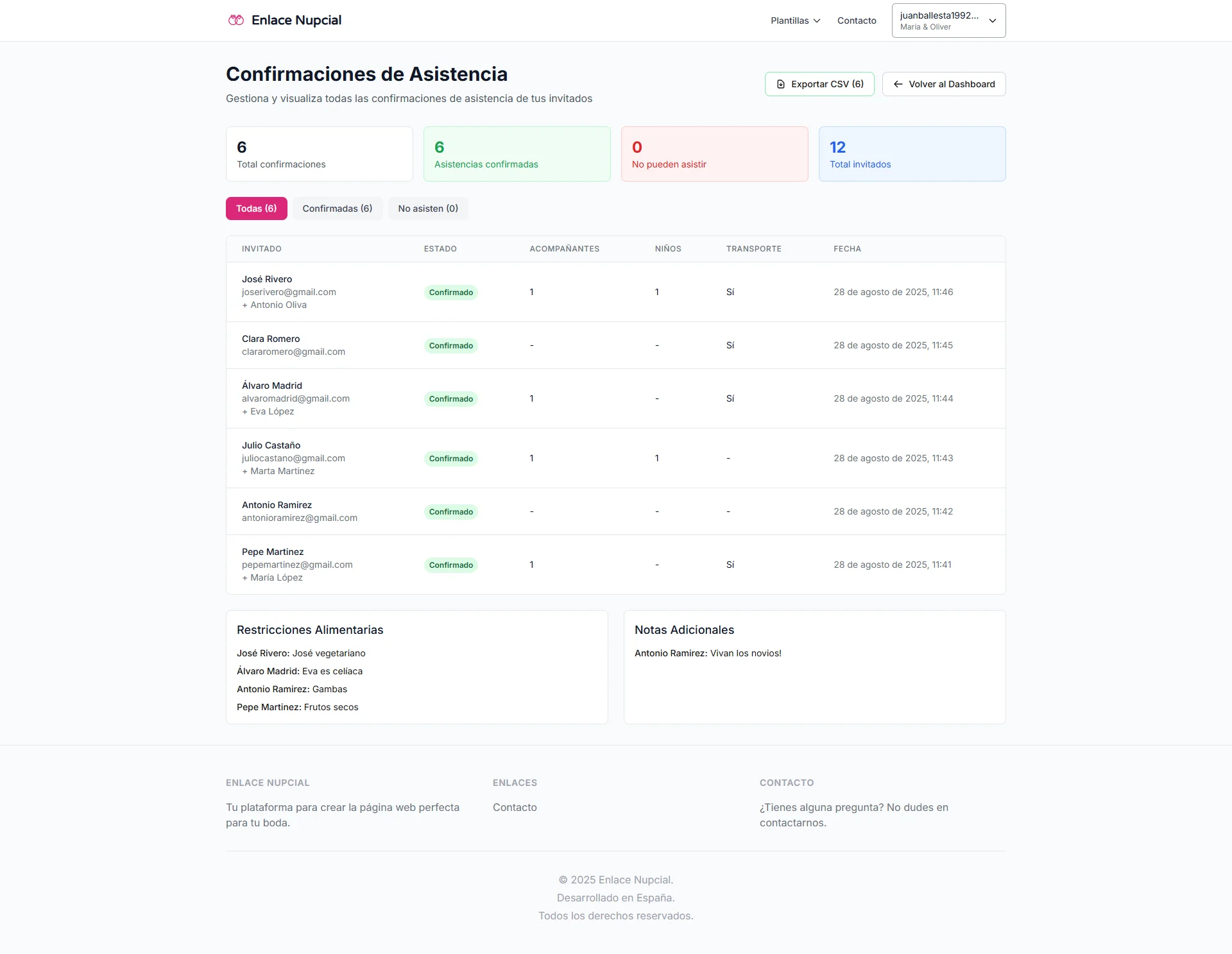
Each couple confirms on their site. You see meals, allergies, and pending replies, then export Excel or PDF for catering — without chasing texts.
No credit card. You land in the demo dashboard and pick a plan when it fits. From $29.99/mo.
The count does not live in a group chat
Replies land wherever they land. Allergies in a DM, a decline in another thread. The count you invoice does not match the list.
Yeses and nos everywhere
Texts, email, and a sheet two people edited. You count the same list three times.
Meals and allergies that never hit catering
The detail is in a message. It is not in the file you send to invoice.
A late change moves seating and the bill
One last-minute yes does not just change the count — it moves the chart and the order.
One form per wedding, on the couple’s site
Guests confirm there. You see accepted, pending, and declined in the dashboard.
Real fields — not just yes or no
Meal, allergies, notes, kids, plus-ones, transport, welcome event, and after-party.
Excel, PDF, and an email when they reply
Export the list and get pinged at the address you set. Seating uses the confirmed guests.
What you can ask
Allergies, meal choice, notes, kids, plus-ones, transport, welcome event, and after-party — set per client.
Download one event’s list, without mixing other couples, in the format catering expects.
Pick the inbox that gets each new RSVP. Confirmed guests feed the seating chart.
A short walkthrough of a confirmation and live totals is coming soon. Until then, try it in the dashboard.
A visual demo of this tool is coming soon. Get started and open it in the dashboard.
Yes. Each wedding has its own list and form on that couple’s website. You see all of them from one dashboard.
Meal, allergies, notes, kids, plus-ones, transport, welcome event, and after-party — configurable per wedding.
Yes. Export that wedding’s list as Excel or PDF, without mixing other clients.
Yes. Set the address that should get a ping on each new RSVP.
Yes. Confirmed guests are in the seating tool, with no retyped names.
No. Get started free, land in the demo dashboard, and pick a paid plan only if it fits.
Turn confirmed guests into a reception layout and export it for the venue.
Build the run of show your vendors and team follow on wedding day.
The link where guests RSVP: digital invitation and confirmation together.
The space where couples follow the wedding — your logo on Atelier.
Get started, publish a confirmation form for your next wedding, and export a guest count you can trust.